

Google Search Console (GSC) is like a digital control room where you can see how your ecommerce website is performing on Google Search. For large ecommerce sites with thousands of product pages, categories, and variations, verifying the site correctly is the first essential step to understanding traffic, fixing errors, improving rankings, and ensuring your products show up in search results.
Whether you are launching a huge marketplace or running a well-established online store, verification tells Google that you own the site. Only after verification can Search Console show you search analytics, indexing status, coverage reports, and error data that help improve SEO performance. Let’s dive into how this works, step by step.
 |
| Google Search Console Verification for Large Ecommerce Sites? |
Why Verification Matters for Ecommerce Sites
When you verify your ecommerce site in Google Search Console, you unlock powerful insights that help with SEO and visibility on Google. Without verification:
- You can’t see which keywords bring users to your store.
- You may not know which product pages are indexed.
- Google won’t show you crawl errors, mobile usability issues, or rich result problems that affect ecommerce performance.
- You miss alerts and suggestions that help you fix SEO issues quickly.
For large ecommerce sites with many products, several categories, and multiple subdomains (such as shop.example.com, blog.example.com, etc.), verification ensures all parts of your store are monitored properly in one place.
Domain Property vs. URL Prefix Property
Google Search Console lets you verify your site in two main ways:
1. Domain Property
This is the most complete and recommended method for large ecommerce sites. When you verify a Domain Property, it covers all versions of your site:
- https://example.com
- https://www.example.com
- http://example.com
- Any subdomains like
shop.example.comorblog.example.com - All protocols and subfolders
This means one verification covers everything under your main domain.
2. URL Prefix Property
This is a narrower approach where you verify only specific URL structures such as:
- https://www.example.com
- https://shop.example.com
- https://example.com/products
URL prefix verification requires you to verify each version separately. For very large sites, this can become unwieldy unless you need to monitor specific parts of the site individually.
Which One Should You Choose?
For a large ecommerce store, start with Domain Property verification. It gives you the broadest coverage, includes all subdomains and protocols, and reduces the risk of gaps in data. Then, for any special sections you want to track separately (like a blog or support portal), you can add URL Prefix properties.
How to Verify a Large Ecommerce Site in Google Search Console
Now let’s look at how you actually verify your site step by step.
Step 1: Prepare Your Google Account
Before anything else, you need a Google account to use Search Console. This could be a Gmail account or a business Google account. Log in to Google Search Console with that account.
Once logged in, you’ll see the “Add Property” option where you can choose either Domain or URL Prefix.
Step 2: Domain Verification (Recommended for Ecommerce)
This is the widely recommended method for large ecommerce stores because it covers everything under your domain.
How Domain Verification Works
- Go to Google Search Console and choose Domain Property.
- Enter your root domain (example.com) without
http,https, orwww. - Google will give you a TXT record that you need to add to your domain’s DNS settings.
Adding the DNS TXT Record
The TXT record tells Google that you control the domain. You’ll need access to your domain registrar (such as GoDaddy, Cloudflare, Namecheap, etc.):
- Sign in to your domain registrar.
- Find DNS management or DNS settings.
- Add a new TXT record with the value Google provides.
- Save your changes and wait for DNS propagation (this could take up to 48 hours in some cases).
Once Google detects the TXT record, your site will be verified. This method proves you own the domain beyond doubt and captures everything Google needs to see across the entire domain.
Step 3: URL Prefix Verification (Alternative Method)
If you cannot access the DNS settings or if you want to verify a specific section of your site, you might choose URL Prefix.
Here are some verification options available for URL Prefix:
- HTML File Upload: Upload a small HTML file provided by Google into your web server’s root directory.
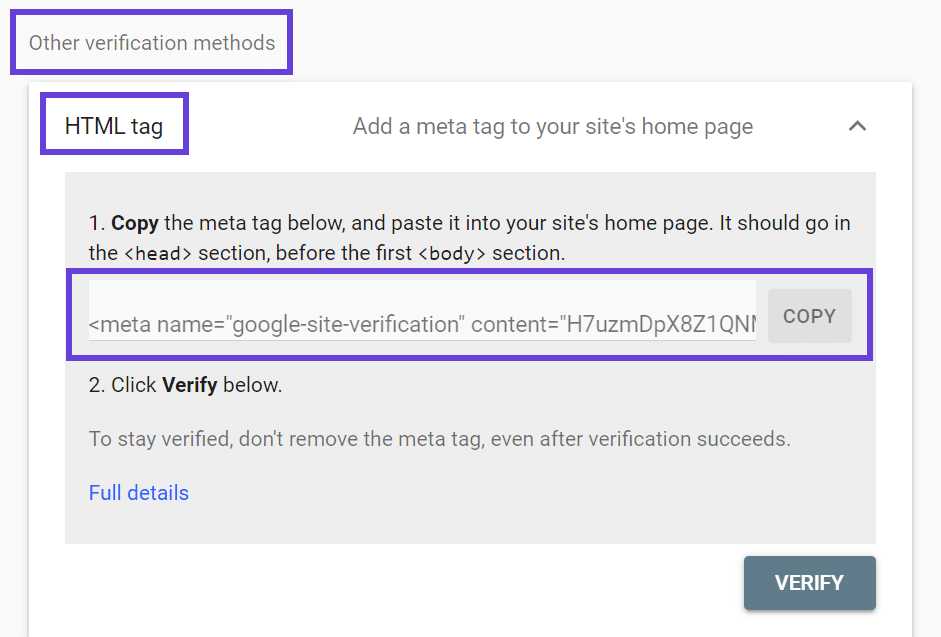
- HTML Tag: Add a meta tag into your homepage’s
<head>section. - Google Analytics: Use your existing Google Analytics setup to prove ownership.
- Google Tag Manager: Use GTM tracking code if installed on your site.
This method is useful when you want to track only certain versions of your site, like a subdomain or a special section.
Common Challenges When Verifying Ecommerce Sites
Large ecommerce sites have some unique challenges during verification:
Multiple Subdomains and Versions
If your domain has multiple versions (www, non-www, subdomain shop, subdomain blog), you must ensure they are included in verification. A Domain property takes care of this automatically, but a URL Prefix requires more manual effort.
Delay in Verification
Sometimes DNS changes take time to propagate. Even though you have added the TXT record successfully, Google might take a while to update its records. Patience is essential.
Verification Errors
Errors can happen if you use methods like Google Analytics or HTML tags incorrectly. For example, if the Analytics code is not placed in the <head> or if the meta tag is malformed, verification might fail. In such cases, switching to DNS TXT verification is usually the most reliable solution.
After Verification: What to Do Next
Once your ecommerce site is verified, your journey begins rather than ends.
Submit Your Sitemap
A sitemap is a file that lists all your important pages (products, categories, blogs). Upload your sitemap in Search Console under Indexing > Sitemaps. This helps Google find and index all your pages more efficiently.
For large ecommerce stores, indexing issues can happen if Google doesn’t understand your URL structure or if there are many faceted navigation URLs (for example, filters or search parameters). A well-structured sitemap helps solve this.
Monitor Crawl Errors and Coverage Reports
Large sites can have hundreds of pages with errors like 404s or redirect issues. In Search Console, the Coverage Report shows which pages were indexed and which have problems. Fixing these issues can improve your search performance significantly.
Check Mobile Usability
Google now uses mobile-first indexing, which means it looks at how your site works on mobile devices. Search Console’s mobile usability reports help you find things like buttons that are too close or text that is too small — common issues for ecommerce layouts.
Use Search Analytics Reports
Once verified, Search Console’s Performance report shows:
- Which keywords drive traffic to your ecommerce site.
- The pages that get the most clicks.
- Top countries and devices of your audience.
These insights help you tailor your SEO strategy and understand how shoppers find your products.
Final Thoughts
Verifying a large ecommerce site in Google Search Console is not just a checkbox task. It is a strategic move that unlocks powerful tools to help you improve SEO performance, fix hidden errors, monitor indexing, and understand your organic search presence. Choosing the right verification method — and especially favoring a domain property with DNS TXT verification — sets a strong foundation for long-term SEO success.
Once verified, continue exploring all Search Console features like sitemap submission, coverage reports, performance analytics, and mobile usability insights. These tools help ensure your online store remains visible, indexed, and competitive in search results.
By following the steps and best practices shared in this guide, your large ecommerce site will be well equipped to thrive in Google Search and attract more organic traffic over time.
Related Questions & Answers
How can a large ecommerce site verify ownership in Google Search Console?
A large ecommerce site can verify ownership using domain-level verification via DNS records, which is the most scalable and secure method. It allows coverage of all subdomains and protocols, ensuring complete data access without needing to place verification files on multiple servers.
Why is DNS verification recommended for enterprise ecommerce websites?
DNS verification is recommended because it provides long-term, stable access to Search Console even when website structure, CMS, or hosting changes. Large ecommerce sites often undergo updates, and DNS verification avoids repeated re-verification issues across thousands of pages.
Can multiple team members access Google Search Console after verification?
Yes, once verified, the site owner can add multiple users with different permission levels such as full or restricted access. This is essential for large ecommerce teams where SEO managers, developers, and marketing teams need controlled access to performance and indexing data.
What challenges do large ecommerce sites face during Search Console verification?
Common challenges include coordinating with IT teams for DNS access, managing multiple domains or international subdomains, and ensuring correct implementation across staging and production environments. Any DNS misconfiguration can delay verification and impact timely access to critical SEO data.
Is HTML file verification suitable for large ecommerce platforms?
HTML file verification is generally not ideal for large ecommerce platforms because server migrations, CDN changes, or platform updates can remove the file. This method also only verifies a single URL version, making it less reliable compared to domain-level DNS verification.
How does verification impact indexing for large ecommerce websites?
Verification itself does not affect indexing directly, but it enables access to indexing reports, crawl errors, and performance data. For large ecommerce sites, this insight is crucial to manage millions of product URLs, resolve errors quickly, and optimize crawl budget effectively.
Can ecommerce sites with multiple countries verify all versions together?
Yes, by using domain-level verification, ecommerce sites can verify all country-specific subdomains or subfolders under one property. This approach simplifies management and provides a unified view of international performance while still allowing granular analysis per region.
How long does Google Search Console verification take for large sites?
Verification is usually instant once the DNS record propagates, though it can take up to 24–48 hours depending on the DNS provider. Large ecommerce sites should plan verification during low-change periods to avoid conflicts with ongoing technical deployments.
What role does IT involvement play in Search Console verification?
IT teams are critical because they manage DNS settings, server access, and security policies. For large ecommerce sites, close collaboration between SEO and IT ensures correct implementation, faster verification, and long-term stability of Search Console access.
What should be done after successful verification of an ecommerce site?
After verification, the site should submit XML sitemaps, review indexing and coverage reports, set preferred domain settings, and monitor crawl stats. For large ecommerce sites, this helps identify technical issues early and supports scalable SEO optimization strategies.